

Account Wallet
Store multiple payment methods on an account, choose a primary and backup card, and let billing automatically fall back if the primary fails.
The Account Wallet lets you store multiple payment methods on a single account, designate a primary card for automatic billing, and a backup card that takes over if the primary fails. It gives your team flexibility when collecting payment and reduces involuntary churn caused by expired or declined cards.
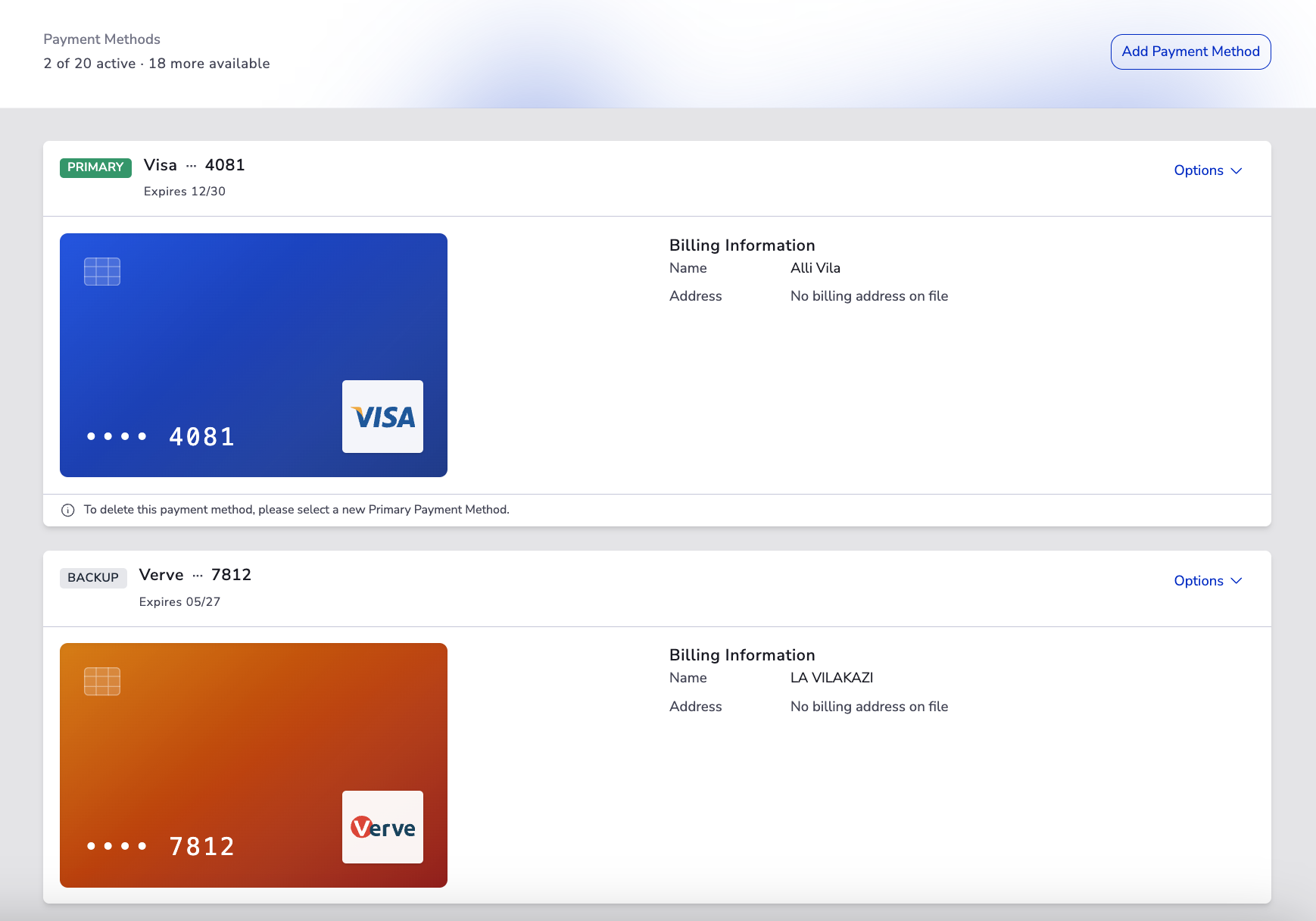
Key Benefits#
- Payment flexibility — Store up to 20 active payment methods per account and switch between them as the customer's situation changes.
- A reliable default — The primary payment method is used automatically for collection, so there's nothing to remember at billing time.
- Built-in fallback — If a charge against the primary card fails, the backup card can be used to recover the payment without staff intervention.
- Secure card capture — Card details are entered on the connected payment gateway, never in the portal. Only the gateway authorization metadata (brand, last four, expiry) and its tokenised card is stored.
- Auditable billing history — All transactions, credits, refunds, and external payments tied to the account remain visible from the account dashboard.
Wallet Concepts#
| Concept | What it means |
|---|---|
| Billing info | A stored billing record on an account, including contact details, billing address, validity, and gateway authorization metadata. |
| Payment method | The funding source represented by gateway authorization data — card brand, last four digits, expiry, bank, and the reusable gateway token. |
| Primary payment method | The default card used for automatic collection. |
| Backup payment method | A secondary card used if a charge against the primary fails. |
| Wallet limit | An account can hold up to 20 active payment methods. |
Management Capabilities#
Definitions#
- Billing info — the stored billing record on an account. It groups the cardholder name, billing address, validity flag, and the gateway authorization metadata for one payment method.
- Payment method — the funding source itself. In MyPetParlor today this is the card represented by the gateway authorization (brand, last four, expiry, and reusable token).
- Primary payment method — the default payment method used to collect against the account unless something else is specified at the subscription or invoice level.
The wallet exposes endpoints and UI actions for:
- Creation — when a new billing info is added it is assigned its own ID. The first billing info on an account is automatically promoted to primary.
- Modification — an existing billing info can be promoted to primary or demoted to backup at any time without re-entering card details.
- One-time purchases and subscriptions — once stored, billing info is available to be assigned to subscriptions or used for one-time purchases against the account.
Accounts & Subscriptions#
- Per-account wallet — every billing info gets its own unique ID, which is what subscriptions and invoices reference.
- Wallet limit — an account can hold up to 20 active payment methods. The Payment Methods header shows how many slots are used and how many remain.
- Subscription defaults — by default, subscriptions are billed against the account's primary payment method. Where the workflow allows it, a specific billing info can be assigned to a subscription instead, or changed later.
Payment Methods and Subscriptions#
- The first payment method added to an account is automatically the primary.
- Subscriptions that have no specific billing info assigned will follow whichever card is currently primary. Promoting a different card to primary moves those subscriptions onto the new card on the next billing attempt.
- Pinning a specific billing info to a subscription locks that subscription to that card, even if the account's primary later changes.
- If a subscription is pinned to a billing info that is later deleted, the subscription falls back to the account's current primary payment method.
- Deleting every payment method on an account that has active subscriptions will cause those subscriptions to fail to bill until a new payment method is added.
Invoices#
- Invoices generated for the account default to the account's primary payment method when no specific billing info is supplied.
- A specific billing info can be set on an invoice — for example to retry collection of a past-due invoice against a different card — without changing the account's primary.
- Unpaid and past-due invoices continue to follow the primary payment method unless they have been pinned to a specific billing info.
- Updating a stored billing info can trigger a fresh collection attempt on any unpaid invoices that reference it.
Deleting Billing Infos#
- Non-primary billing infos can be deleted at any time from the Options menu on the card row.
- The sole billing info on an account (when it is the only card) can also be deleted, but doing so leaves the account with no payment method on file.
- When more than one card exists, the active primary cannot be deleted directly. Promote a different card to primary first, then delete the former primary. The Payment Methods page surfaces an inline note when this guard applies.
Subscriptions or invoices that were pinned to a deleted billing info will fall back to the account's primary payment method for the next charge unless they are pinned to a different card.
Adding a Card#
- Click Add Payment Method at the top of the page.
- Complete the short cardholder details form and submit. The portal initialises an authorization with the connected payment gateway.
- The browser is redirected to the gateway's secure card-entry page. The customer (or staff member) enters the card details there.
- The gateway returns the browser to the portal's Authorize Payment Method page, which verifies the authorization automatically.
- On success a confirmation toast appears and you're returned to the Payment Methods page with the new card listed.
If verification fails, the page shows "Payment method authorization failed" with a Back to payment methods button. The card is not saved and you can try again.
Setting a Primary or Backup Card#
Use the Options menu on each card row:
- Set as Primary — promotes a valid card to be the new primary. The previously primary card stays in the wallet and can be demoted to backup.
- Demote to Backup — only available on the current primary when at least one other card exists. Future failed charges on the new primary will fall back to this card.
Always keep a backup card on file. If the wallet shows only one card, the page surfaces an inline reminder suggesting you add a second.
Card Validity#
A card may show an Invalid pill when the gateway has flagged its authorization as no longer usable — for example, an expired card or a revoked authorization. Invalid cards cannot be set as primary. To replace an invalid card, add a new payment method and delete the invalid one.
Card Capture and Security#
The portal never stores raw card numbers. Card data is captured on the connected payment gateway and the wallet only retains the authorization metadata returned by the gateway:
- Authorization code and reusable token.
- Card brand and last four digits.
- Expiry month and year.
- Bank and country code.
For gateway setup, see What is a Payment Gateway?.
What is Not Yet in the UI#
The following workflows are not yet exposed from the Payment Methods page:
- Editing a stored card or its billing address in place — replace it by adding a new card and deleting the old one.
- Choosing a subscription-specific billing info from the wallet view.
- A wallet-level audit history of additions, primary or backup changes, and removals.
- An in-product explanation of payment retry and dunning behaviour.