

Invoices dashboard
Use the Invoices dashboard to view, search, filter, and open invoices across all accounts.
The Invoices dashboard is your central list view for invoice activity across all customer accounts. Use it to track invoice status, review amounts, narrow results with filters, and open invoice details quickly.
Viewing Your Invoices#
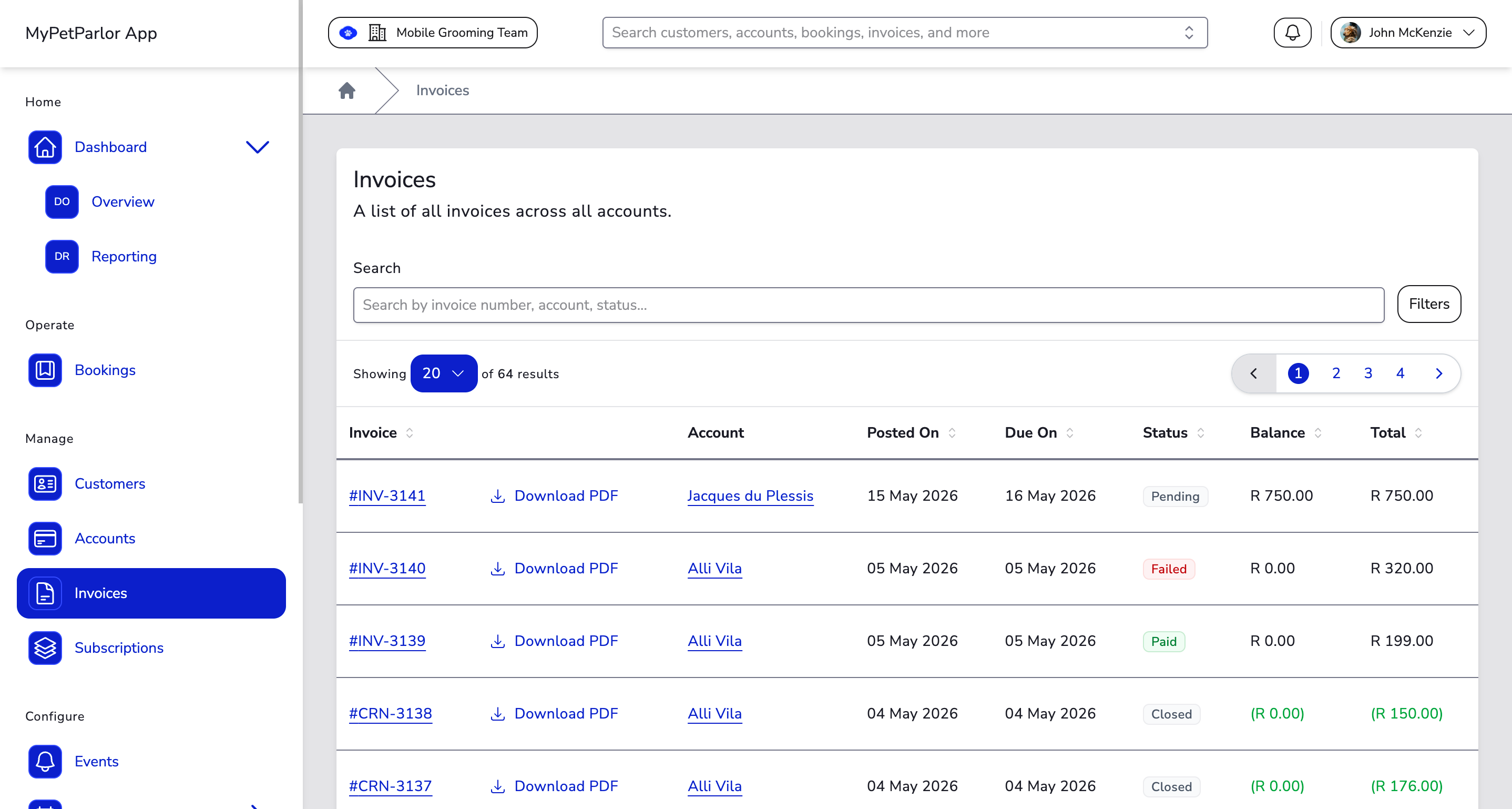
The dashboard displays invoices across accounts with the following columns:
| Column | Description |
|---|---|
| Invoice | The invoice number. Click it to open full invoice details. |
| Download PDF | Download a PDF copy of the invoice directly from the list. |
| Account | The billing account linked to the invoice. |
| Posted On | The date the invoice was posted. |
| Due On | The due date for collection terms where a due date applies. |
| Status | The current invoice state, such as Pending, Processing, Past Due, Paid, Failed, or Closed. |
| Balance | The outstanding amount still owed on the invoice. |
| Total | The final invoice amount after calculations. |
Searching#
Use the Search field at the top of the dashboard to find invoices quickly. Results update as you type. You can search by:
- Invoice number
- Account name
- Account email or contact details shown on the invoice
- Invoice status
Filtering#
Click the Filters button to open the filter panel:
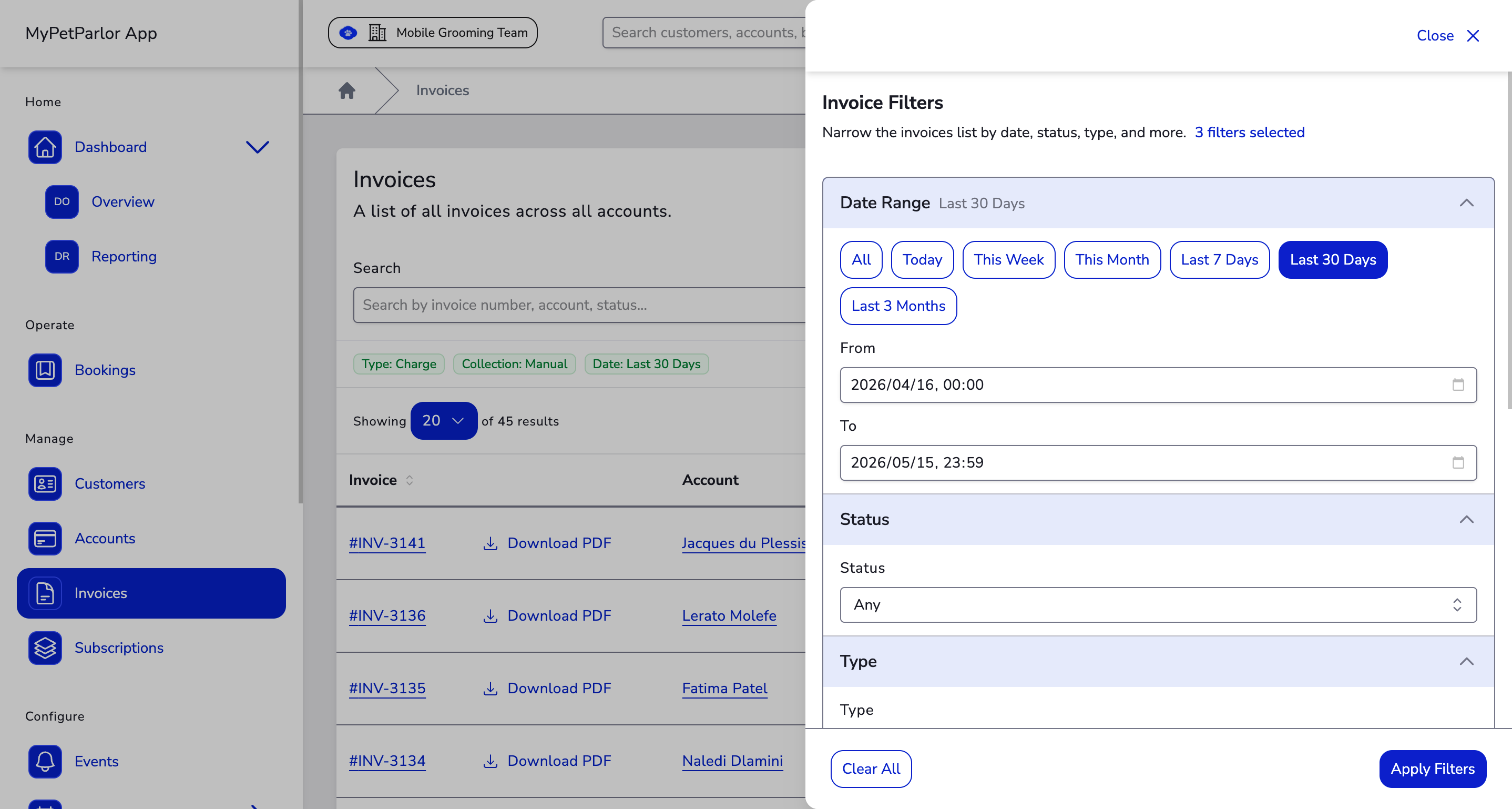
- Date Range — Filter by creation date using presets (Today, This Week, This Month, Last 7/30 Days, Last 3 Months) or custom from/to dates.
- Status — Filter by invoice state (Pending/Open, Processing, Past Due, Paid/Closed, Failed, or Voided).
- Type — Show only Charge or Credit invoices.
- Collection Method — Narrow by how the invoice is collected (Automatic or Manual).
- Origin — Filter by how the invoice was created (for example Purchase, Renewal, Refund, Write Off, Gift Card, Import).
- Currency — Restrict results to a single currency.
Active filters appear as coloured pills below the search bar. Click Reset to clear all filters.
Combine search and filters for faster triage. For example, filter by Past Due and then search by account name to isolate follow-up items.
Sorting#
Organise the invoice list by clicking any of the sortable column headers. Click a header again to toggle between ascending and descending order. You can sort by:
- Invoice number
- Posted On (date the invoice was posted)
- Due On (date the invoice is due)
- Status
- Balance
- Total
Pagination#
When you have many invoices, the dashboard paginates results automatically. Use the controls at the top and bottom of the table to navigate between pages or change the number of results shown.
Charge Invoice Statuses#
Pending/Open#
- Initial state. Invoices start as Pending, indicating they are neither paid nor past due.
- Automatic collection. Invoices attempting collection automatically move to Paid/Closed or Past Due based on the transaction result.
- Manual collection. Invoices under manual collection remain Pending until payment is received or the configured due date is reached.
Processing#
- Definition. An invoice is Processing when a payment has been initiated but the result is still pending. This is common with bank-based payment methods.
- Outcome. Once the transaction resolves, the invoice updates to Paid/Closed, Past Due, or Failed depending on the result.
Past Due#
- Criteria. An invoice becomes Past Due if it remains unpaid by its due date.
- Automatic collection. Invoices that decline on the initial transaction are marked Past Due straight away.
- Manual collection. Invoices switch to Past Due once the due date has passed without payment.
- Account balances. Available account credit can be applied to past due invoices to settle them.
Paid/Closed#
- Definition. An invoice is Paid/Closed when the full balance has been settled.
- Zero balance. Invoices that post with a zero balance (because of credits, discounts, or adjustments) are immediately marked Paid/Closed.
- Manual collection. Invoices under manual collection reach Paid/Closed once the customer has paid the balance in full.
Failed#
- Definition. An invoice is marked Failed when it has been deemed uncollectable and written off.
- Credit balancing. When a charge invoice fails, a corresponding write-off entry is created so the customer's balance reflects the loss correctly.
Voided#
- Definition. A Voided invoice has been cancelled and is no longer collectable. Voided invoices do not affect the customer's balance.
Credit Invoice Statuses#
Open#
- Initial state. Every credit invoice begins as Open, indicating an outstanding credit balance available to the customer.
Processing#
- Definition. A credit invoice enters Processing when a refund transaction is initiated but the result is still pending (common with bank-based refunds).
- Balance adjustments. The processing transaction amount is temporarily deducted from the credit balance. If the refund declines, the balance is restored.
- Status outcome. After the transaction resolves, the credit invoice updates to Closed if successful with no remaining balance, or reverts to Open if declined.
Closed#
- Definition. A credit invoice is Closed when it has no outstanding credit balance.
- How it closes. A credit invoice can close because its full balance was used to pay other charge invoices, refunded to the customer, or a combination of both.
- Reopening. A Closed credit invoice can reopen if a related payment is voided — for example, if a corresponding charge invoice fails after the credit was applied.
Voided#
- Definition. A credit invoice is Voided when it is identified as a mistake or no longer needed.
- Implications. Voiding a credit invoice means its credit balance was neither used for payments nor refunded to the customer.