

Account Acquisition Data
Track where an account came from using acquisition cost, source channel, campaign, and subchannel data.
Account acquisition data captures the marketing and acquisition details that brought a customer onto the account record. Its primary role is to combine your business's customer acquisition costs with the revenue data already held in MyPetParlor App, so your team can make informed decisions about marketing spend, channel performance, and lifetime value.
Overview#
MyPetParlor App records pivotal marketing and account acquisition details directly on the account. By holding cost and revenue data side by side, you can:
- Measure customer acquisition cost (CAC) against subscription, invoice, and lifetime revenue.
- Identify which marketing channels and campaigns produce the highest-value accounts.
- Compare campaigns and sub-channels for relative performance.
- Repeat the referral and sales motions that work best for the business.
Acquisition Data#
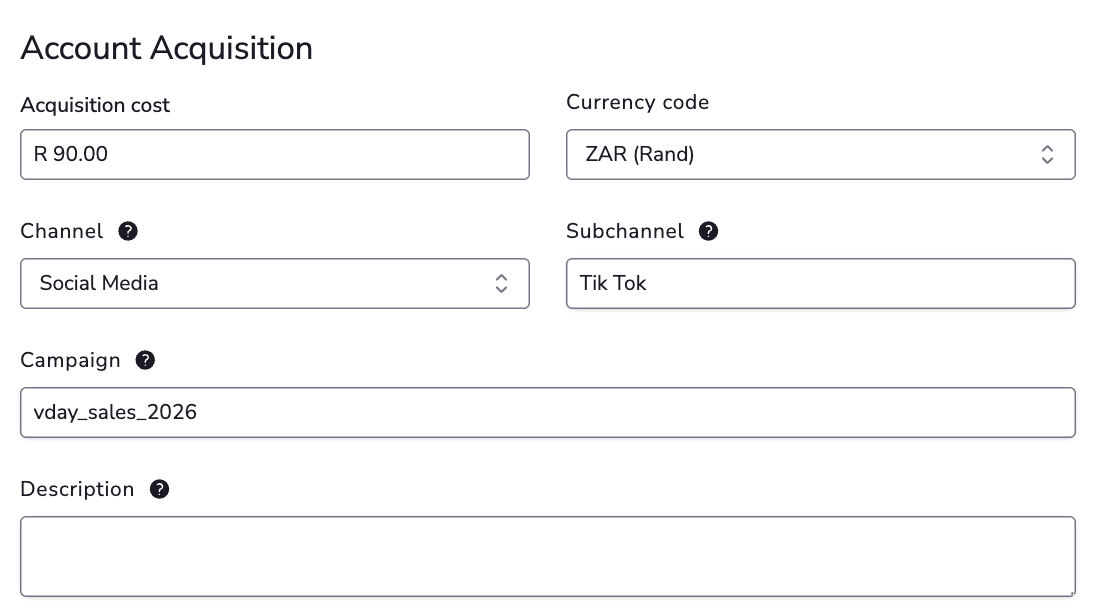
Capture the following details for each account:
| Field | Description |
|---|---|
| Cost to Acquire Customer | The cumulative cost incurred through marketing activities to acquire the customer. |
| CAC Currency | The currency used for the acquisition cost, represented as a 3-letter ISO code such as ZAR or USD. |
| Acquisition Channel | The medium through which the customer was acquired (for example, paid search, referral, email). |
| Acquisition Sub-Channel | A flexible field that further details the acquisition channel — such as a specific ad group, campaign type, partner, or referral stream. |
| Campaign ID | An identifier for the marketing campaign attributed to the account conversion. Typically originates from a marketing automation system. |
| Channel Description | Optional extra context for the channel, such as the platform, partner, or campaign source. |
Integrating Data#
To get the most out of acquisition data, integrate the values from your marketing automation system into the fields above.
Account acquisition data can be sent in two ways:
- Via the API — recommended. The API exposes create and update structures for account acquisition data, which avoids the manual-entry errors common with UI capture and saves time at scale.
- In the UI — a future Acquisition card on the account detail page will let your team review and amend acquisition fields manually.
Once the account is updated with acquisition details, the data is associated with that account and is available for reporting and exports.
Exports#
Account acquisition data is available via the Accounts export. Use the export to combine acquisition cost and channel attribution with subscription, invoice, and revenue data for downstream reporting.