

Broadcast Analytics
Read the delivery funnel on the broadcast detail page — sent, delivered, read, replied, failed — understand the rates that matter, and drill into per-recipient statuses.
Once a broadcast starts sending, its detail page turns into a live dashboard: a delivery funnel, headline rates, and a per-recipient list that updates as WhatsApp confirms each message. This article explains what every number means — and what to do about it.
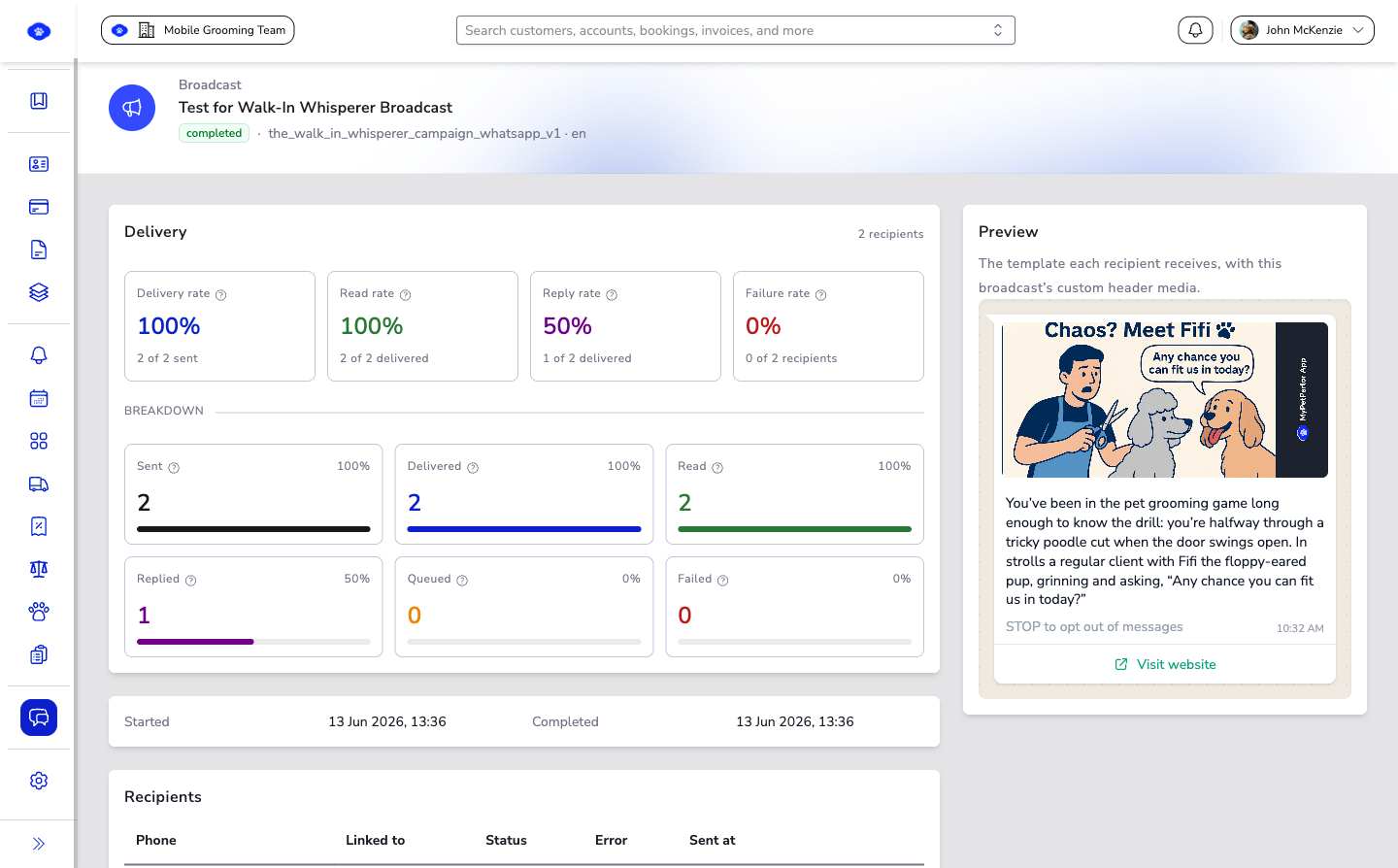
The Delivery Funnel#
Each recipient moves through stages, and the funnel counts them:
| Stage | Meaning |
|---|---|
| Queued | Still waiting to be handed to WhatsApp — not sent yet. |
| Sent | WhatsApp accepted the message. This is provider acceptance, not yet delivery to the handset. |
| Delivered | WhatsApp confirmed the message reached the recipient's device — two grey ticks. |
| Read | The recipient opened the message — two blue ticks. |
| Replied | The recipient replied to the broadcast message. |
| Failed | The message could not be sent or delivered — an invalid number, an opt-out, or a provider error. |
While the broadcast is running, these counts stream in live — you can watch the funnel fill without refreshing.
Read counts depend on the recipient having WhatsApp read receipts switched on. A message can be read without ever showing blue ticks, so treat Read as a floor, not an exact figure.
The Rates That Matter#
Above the funnel, four headline rates do the arithmetic for you — each against its meaningful denominator rather than the whole audience:
| Rate | Formula | What it tells you |
|---|---|---|
| Delivery rate | Delivered ÷ Sent | How much of what WhatsApp accepted actually reached a device. |
| Read rate | Read ÷ Delivered | How compelling your opening line was among messages that arrived. |
| Reply rate | Replied ÷ Delivered | How well the message provoked engagement. |
| Failure rate | Failed ÷ Recipients | The share of your audience that errored. |
Hover the help icon next to any stat for its plain-language definition right in the page.
The Recipient List#
Below the stats, every recipient has a row:
| Column | What it shows |
|---|---|
| Phone | The recipient's WhatsApp number. |
| Linked to | Whether the number belongs to a known customer or employee in your workspace. |
| Status | Their current funnel stage — queued, sent, delivered, read, and so on. |
| Error | For failures: the reason WhatsApp gave. |
| Sent at | When the message was handed to WhatsApp. |
This is where you turn aggregate numbers into action — sort out exactly which numbers failed and why.
Acting on the Numbers#
- High failure rate? Check the Error column. Invalid numbers mean your contact data needs cleaning; template errors mean the template needs attention.
- Low delivery rate? Recipients may be offline (delivery arrives late) — or your number's standing with WhatsApp needs care. Sending relevant content to people who want it is the long-term fix.
- Low read rate? Your first line is the preview — make it earn the tap.
- Low reply rate? Give people something to respond to — a question or a clear call to action.
The Send broadcasts guide covers the craft side — audience choice, timing, and message quality — in its Measure and improve section.
Compare rates between your own broadcasts rather than against industry benchmarks — your audience, opt-in quality, and message types make your history the only fair baseline. A read rate that drops from one send to the next tells you something real.